Controlling an LED Strip with Arduino
Essential for any Homemaker
The Idea
When my San Francisco roommate, Aubrey Wahl, bought a strip of LED lights like this to decorate our otherwise-overly-normal-looking home, the first thing I noticed was that the pins connecting the LEDs to the controller box looked like they would fit in my breadboard. A lot of my projects start with the realization that two things look like they might fit together, actually…
The original controller can receive input from a small remote and change the colors of the lights or manipulate them in preset patterns. If I could control the lights with my Arduino, I figured I could make the strip do something cooler — though exactly what I wanted it to do was not immediately obvious.
I decided to break the project into three parts:
- Figure out how to control the RGB value of the strip (it's all one circuit, so the strip must always be one solid color) from the Arduino.
- Have the Arduino read the desired RGB value from a computer over a serial connection, essentially letting the computer control the LEDs. This modular approach let me mess around with the lights using just the computer, without re-uploading my program to the Arduino over and over again.
- Think of something cool for the computer to do to the LEDs. I eventually settled on having the LEDs react to sounds, including spoken word and music. I had the computer analyze ambient sound with an FFT and turn the results into an RGB value for the Arduino.
The Result
Here is the end product — a video of my roommate and me grooving to an XXYYXX song. The lighting in the room is controlled entirely by the computer picking up and reacting to the music with its mic. There is no software connection to the device playing the music.
You can see that the LEDs are pretty good at reacting to the beat, which made this device fun at parties. The color changes are a little less predictable, since the very simple FFT-based analysis isn't really sufficient to capture the essence of a musical phrase-change — but no one complained, because the beat-following worked so well and the color unpredictability was rather fun.
The Arduino and Circuit
The circuit (I wised-up after this and started supporting real Arduino — forgive me):
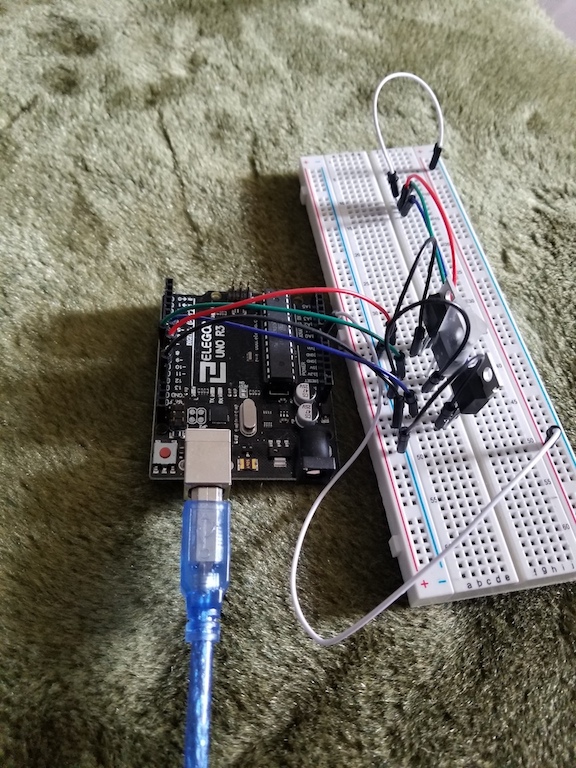
I won't talk about the circuit too much, since I basically borrowed the design from Adafruit. Instead, here are some fast facts I learned:
- Power transistors and pulse-width modulation are a powerful combination. With one 5V pin you can control the 0–255 intensity of red, green, or blue on the 12V LED circuit by using the transistor to flip the 12V supply on and off fast enough that our eye interprets the result as, say, 128/255 brightness.
- The Arduino gets its instructions from the computer by reading a single byte. Depending on which predefined range the byte's value falls into, the Arduino reads it as a change to the red, green, or blue value, or a fourth modification of overall brightness (not really necessary, but it made tinkering easier). I sacrificed some precision — both from byte-loss and because there wasn't enough info to represent full 0–255³ detail — but it was really fast, which made the system more responsive. Totally worth it.
The Computer
The computer runs a simple Processing script, which is fun because anyone can walk over and play with the parameters. Check out the repo.
Basically, the code runs an FFT (fast Fourier transform) on incoming sound, then aggregates the waveform breakdown into experimentally-determined bins. The size of the lower (bass) bin affects the proportion of red light, mid controls green, and treble controls blue. The idea is that at least some shifts in some songs are marked by big shifts in these three bands (a bass drop, a high instrument coming in, etc.). In practice, songs are so complex and there's so much noise pollution that it's never this simple. The color would change rapidly, which was unsettling, and seemed nearly uncorrelated to the song.
I fixed this by introducing a continuously-normalizing factor for each color. No matter what sound is playing, if it remains unchanged the color slowly regresses to white, as each band's "baseline" adjusts to the current level. This let the device pick up on many more musically-relevant shifts. Since it's always comparing the level to the moving-average level, it's way easier for it to notice a bass-drop, for instance. It also introduced some randomness, since the function now had some "memory" — its output depended on what it heard for the past x seconds. Is the song shifting a lot? Did you say something to your friend 15 seconds ago? That will affect the lights. So they still missed some pretty obvious musical shifts, but they looked a lot smoother and sometimes lined up pretty well.
I also introduced the overall brightness parameter I mentioned earlier. This bypassed the FFT and was just a function of continuously-normalizing sound intensity. Since I wasn't trying to decompose the sound wave, it was a lot more consistent at reacting to obvious changes in volume only. So the lights would flash to the beat or dazzle you when the singer came in, which was great, even as they were somewhat-randomly shifting colors.
Conclusion
My roommate and I took this system to a party, thinking we'd be the coolest guys there. Instead, we were the guys who brought a computer to a party, and people were too weirded out to really get into playing with it. Understandable.
In the end, we taped up the lights in the kitchen, where they flashed along with normal conversation, bluegrass-band practices, and pop music at small gatherings. They were really fun to have around until some moron stuck his laptop charger into the Arduino, thinking it was the 12V power supply, and the circuit caught on fire. The LEDs were actually unharmed thanks to the power-transistor setup, but my roommate decided to protect his original purchase by taking away my mad-scientist privileges.